
Transit Route Planner
Professional transit route planning for any website
Transit Route Planner for Public Transit Agencies
🔬 Developer Preview: Try experimental features on our demo page (staging) or bleeding-edge features on the dev page
Elevate your WordPress site with the Transit Route Planner, a powerful plugin that lets users plan local transit routes with ease. Perfect for city blogs, transit agencies, or community sites, this plugin integrates with Google Maps and local address autocomplete to deliver real-time, optimized routes—including schedules, stops, and transfers—via a sleek, intuitive interface.
Try It Now
Deployment Options
WordPress Plugin: Drop-in solution for WordPress sites. Install, configure via admin dashboard, add shortcode. Perfect for content sites and blogs.
Standalone Installation: Deploy on any website (Rails, Django, static HTML, custom CMS). Includes admin interface and API proxies. Ideal for transit agencies and government sites.
Coming soon: Pure JavaScript widget, NPM package for React/Vue, and hosted API option.
Now Available: iOS App
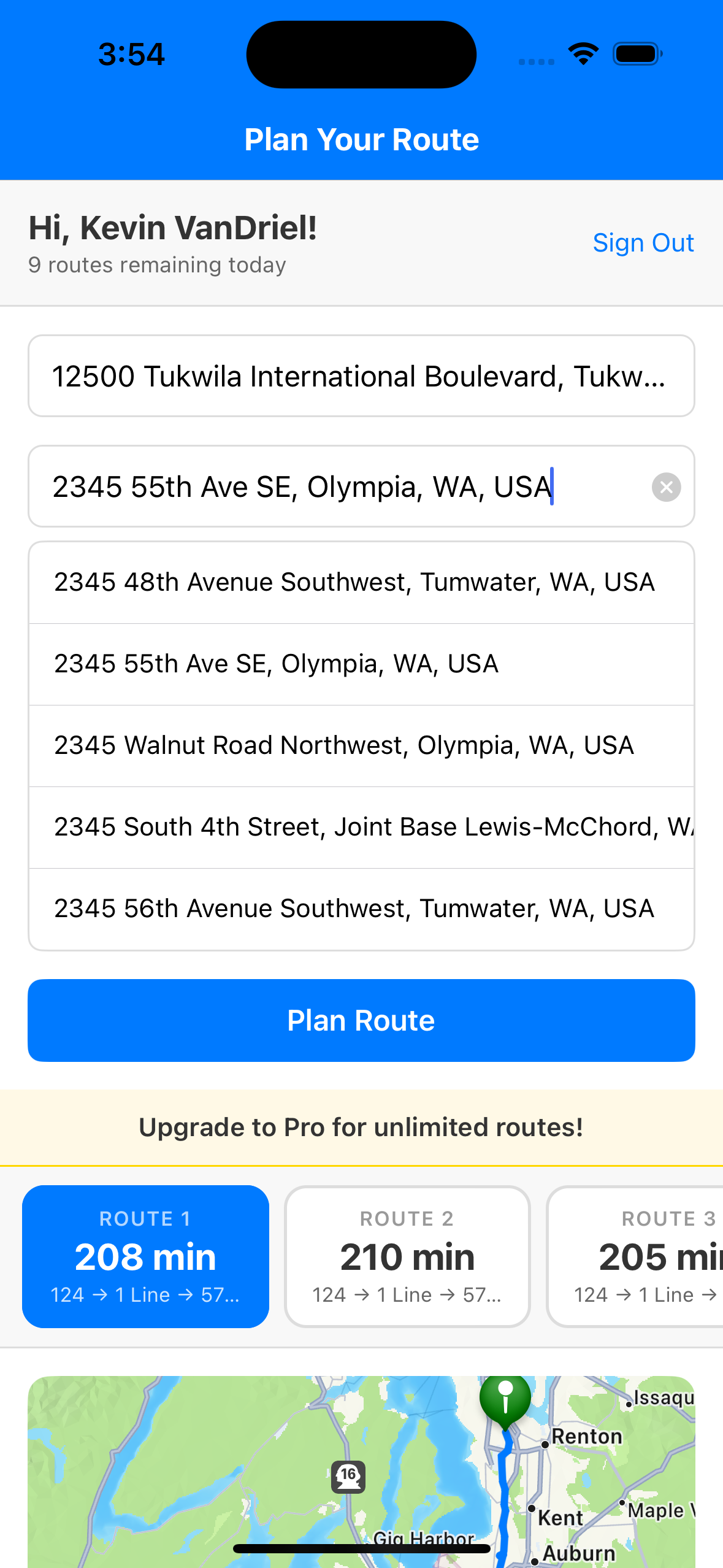
Transit Route Planner is now available as a native iOS app. The same powerful routing engine that powers the WordPress plugin, now in your pocket:
- Google Places Autocomplete — search any address with real-time suggestions
- Multiple Route Options — swipe through alternatives with duration and transit line details
- Interactive Maps — routes rendered along actual roads and transit paths
- Real-Time Transit Directions — step-by-step with transfers, walking segments, and arrival times
- Firebase Authentication — secure sign-in with email/password
Coming soon to the App Store. Interested in early access? Contact us.
Why Choose Transit Route Planner?
- Seamless Integration: Works flawlessly with Google Maps for accurate, real-time transit data.
- User-Friendly: Address autocomplete and clear route displays make planning effortless.
- Customizable: Configure service area boundaries and map behavior via admin settings.
- Engagement Booster: Keeps users engaged with practical, location-specific tools.
- SEO Advantage: Dynamic content drives traffic and increases time on site.
How It Works
Transit Route Planner connects your WordPress site directly to the Google Maps Platform, giving your visitors access to the same routing engine that powers Google Maps. When a user enters a starting point and destination, the plugin calculates the optimal route using real-time transit schedules, traffic data, and walking directions to and from stops.
The plugin handles all API communication through secure server-side proxies, keeping your Google Maps API key hidden from the browser. This security-first architecture means your API credentials are never exposed to end users, protecting you from unauthorized usage and unexpected billing.
Route results display step-by-step directions including departure times, transfer points, walking segments, and estimated arrival times. Users can switch between transit, driving, walking, and cycling modes with a single click. The responsive interface adapts seamlessly from desktop monitors to mobile phones, ensuring accessibility for all visitors.
Built for Transit Agencies
Transit Route Planner was designed with public transit agencies in mind. Whether you serve a small rural community or a mid-size metropolitan area, the plugin helps riders find connections on your system without leaving your website.
Configurable service area boundaries let you restrict route suggestions to your coverage region. Set rectangular bounds around your service territory so autocomplete suggestions only show locations your riders can actually reach. This prevents confusion from out-of-area results and keeps the experience focused on your transit system.
For agencies applying for FTA Section 5311 grants, Transit Route Planner qualifies as an eligible technology expense. Rural transit agencies can use federal formula funds to cover the annual subscription cost, making professional route planning accessible regardless of budget constraints.
Technical Requirements
Transit Route Planner requires WordPress 6.0 or higher and PHP 8.0+. You will need a Google Maps API key with the Maps JavaScript API, Places API, and Directions API enabled. Google provides a $200 monthly free credit that covers most small to medium traffic sites at no cost.
The plugin is lightweight and performance-optimized. JavaScript and CSS assets are loaded only on pages that contain the [transit_route_planner] shortcode, so the rest of your site remains unaffected. The React-based frontend is compiled into a single minified bundle for fast load times, and all API requests are debounced to minimize unnecessary network calls.
Quick Setup Guide
- Download and install the Transit Route Planner plugin.
- Go to “Transit Route Planner” in your WordPress admin dashboard.
- Input your Google Places API key (required).
- Set your service area’s center (latitude/longitude) and radius (1,000 meters = 0.621 miles; 1,609.34 meters = 1 mile).
- Launch a transit planning hub that users will love!
Need help setting up? Visit our complete documentation for step-by-step instructions on Google Maps API key setup, service area configuration, and troubleshooting.
Get It Now
Download: Transit Route Planner
Prerequisite: A valid Google Maps API key with Places API enabled.
Make your site a local transit powerhouse—install Transit Route Planner today!
Who Uses Transit Route Planner?
Public Transit Agencies: Embed a route planner directly on your agency website so riders can plan trips without switching to Google Maps. Keep visitors engaged on your site while providing real-time routing powered by the same data Google uses.
Tourism and Convention Bureaus: Help visitors navigate your city using public transit. Event venues, hotels, and tourism boards can provide directions that include local bus and rail options alongside driving and walking routes.
Universities and Colleges: Campus websites can offer students, faculty, and visitors a way to plan commutes using campus shuttles and public transit connections. Reduce parking demand by making transit information easily accessible.
City and County Government: Municipal websites serving communities of all sizes can add route planning as a public service. Especially valuable for rural areas where transit information is harder to find online.
Feature Comparison
| Feature | Pro (1 Site) | Pro (5 Sites) | Agency |
|---|---|---|---|
| Annual Price | $49/year | $149/year | $299/year |
| Number of Sites | 1 website | 5 websites | Unlimited |
| Route Calculations | ✓ | ✓ | ✓ |
| Google Maps Integration | ✓ | ✓ | ✓ |
| Address Autocomplete | ✓ | ✓ | ✓ |
| Custom Styling | ✓ | ✓ | ✓ |
| Remove Branding | ✓ | ✓ | ✓ |
| Multisite Compatible | — | ✓ | ✓ |
| White-Label Ready | — | — | ✓ |
| Client Projects | — | — | ✓ |
| Priority Support | Email + Phone | ||
| FTA 5311 Grant Eligible | ✓ | ✓ | ✓ |
All tiers include 1-year license with updates and support. Renew annually to continue receiving updates.
Beta Testing Program
Help us improve! We’re offering free Pro licenses to transit agencies willing to:
- Test the plugin on their website
- Provide feedback on features and usability
- Share their experience (optional testimonial)
What You Get
- Free Pro license (1 year, $49 value)
- Direct support from our development team
- Early access to new features
- Optional: Featured as a case study on our website
Interested? Contact us with “Beta Test” in the subject line.
Frequently Asked Questions
Is Transit Route Planner eligible for FTA 5311 grant funding?
Yes! All pricing tiers qualify for Federal Transit Administration Section 5311 grants. Rural and small urban transit agencies can use federal funds to purchase annual subscriptions.
How long does deployment take for a transit agency?
WordPress sites: Under 1 hour. Standalone installations: 2-4 hours including configuration. We provide dedicated onboarding support for transit agencies.
Does it work for small rural transit systems?
Absolutely. Transit Route Planner is designed for agencies of all sizes, with special focus on small and rural transit systems serving communities under 50,000 population.
What makes this better than custom transit software?
No maintenance burden, immediate deployment, regular updates included, and significantly lower cost than custom development. Pay annually instead of $50K+ upfront.
Can we use it without WordPress?
Yes! We offer a standalone installation that works with any website platform or CMS. Perfect for government sites running custom systems.
Pricing Plans
Pro (1 Site)
- ✓ Unlimited routes
- ✓ Custom styling
- ✓ Remove branding
- ✓ Priority email support
- ✓ FTA 5311 grant eligible
Pro (5 Sites)
- ✓ Everything in Pro (1 Site)
- ✓ Use on up to 5 websites
- ✓ Multisite compatible
- ✓ Priority support
- ✓ FTA 5311 grant eligible
Agency
- ✓ Everything in Pro
- ✓ Unlimited websites
- ✓ Client projects
- ✓ White-label ready
- ✓ FTA 5311 grant eligible
All plans are FTA 5311 grant eligible. Federal funds can be used to purchase subscriptions.